eCommerce CRO Checklist v1.2 is live


Blog
•
How To Make It Drop Dead Easy To Share Your Content
me. Your content needs to connect with your audience, otherwise it’s dead. We don’t want dead content, we want content that is drop dead easy to share.
If you create a blog post and nobody reads it, does it exist? Of course it exists, but if nobody reads it then you might as well have done something better with your time. Your content needs to connect with your audience, otherwise it’s dead. We don’t want dead content, we want content that is drop dead easy to share.
How Do People Find Your Content?
Darren Rowse of ProBlogger recently spoke on his popular podcast about how most successful bloggers get the majority of their traffic from search engines and SEO, but that doesn’t mean you should ignore sharing. Sharing occurs when someone reads your blog post, watches your video, listens to your podcast, and then shares a link to it on Facebook, LinkedIn, or Twitter, or gets your email newsletter and forwards it to a friend (or when someone links to your content from their own blog post, like I just linked to Darren’s podcast). In some cases, the value of this kind of sharing can rival SEO and other sources of traffic.
Sharing is valuable for getting your content out there, but a lot of people are doing it wrong. Are you one of them?
The Sharing Mistake Most Influencers Make
The mistake I see a lot of influencers make when it comes to sharing is they make it waaaaay too hard. What people underestimate is how easy sharing needs to be. Here are some examples of people making it too difficult by not making it easy enough, and I’m going to call out some friends and team members of mine who have thick enough skins to take it.
First up, here’s my buddy Daniel Knowlton, who runs KPS Marketing in the UK, asking for some share love in a Slack group we’re both part of for his post on the ultimate live streaming setup:

All Daniel did here was post the link and ask for shares. Thankfully he at least posted the link (if he really wanted to make it difficult he could have just said “Hey, go check out my website and share my latest post,” leaving us to figure out how to even get to his website).
My biz partner Corey Blake just launched his blog and then asked for a share in one of our MWI team Slack channels in similar fashion to Daniel:

Again, just the link.
Here’s another share request from one of our awesome account managers Zach Zimmerman (who you should definitely follow on Snapchat):
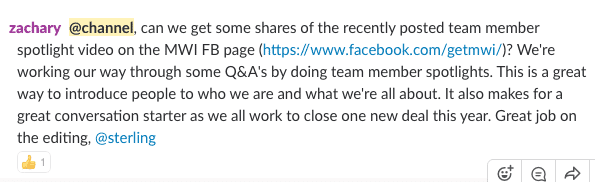
Zach makes it even more difficult by not giving us the direct link to the post he wants us to share, or letting us know exactly which spotlight video is the one we should be sharing.
“Oh c’mon Josh, how could they make it any easier? They’re giving you the link right there?! Stop being so lazy.”
The point is for every degree you make it harder for people to share, you’re going to lose shares. For example, here are the steps to construct a simple Tweet that is formatted correctly via my 5 Twitter Formatting Tips For Beginners:
Click through to the link, or copy and paste it.
Open Twitter
Paste link
Tag author (and other notables who may be in the post). This means figuring out what all their Twitter handles are.
Add hashtags
Customize Tweet text if it doesn’t fit, or if you think it can be improved
Add an image (optional)
Tweet
You could force your audience to go through all these steps (which they won’t) or…you could just make it easy for them.
Note: I’m making an assumption here that you, as an influencer, are going to get more value by increasing the quantity of sharing, and by controlling how your content is shared rather than leaving it up to individuals (not that they can’t do it their own way if they want–you’re just making it a lot easier to do it your way which means they probably will do it your way). However, perhaps Daniel has his reasons for wanting to facilitate sharing in a different way. For example, some websites show social media counts on their pages, but only when someone clicks on the social media icon from that page. Giving people a link might mean you get 50 shares, but that when someone visits your blog post it says “1 share” instead of 50. Do what works for you.
How To Make Sharing Drop Dead Easy
If you want all the shares you can get, make it super, super, incredibly, drop dead easy for people to share your content. It’s not that they don’t want to share, it’s that good intentions often lose out to a packed schedule, and if sharing takes 2-3 minutes instead of 10-20 seconds that is often the difference between sharing and not sharing. Plus, when you leave sharing in the hands of others they’ll do it wrong. They’ll share a tweet linking to your content, but they’ll forget to include your handle, so you miss out on getting the credit and earning more followers, or they won’t give you attribution on LinkedIn, so while your blog post might be getting tons of traffic, which is great, you don’t even know that your friend posted your content on LinkedIn, or that 50 people have commented on his post about you or your content, because he didn’t tag you in his LinkedIn post.
To make sharing easy, give people the link to the exact share you want them to share.
Aaron Orendorff is in the same Slack group Daniel and I are in, and here’s how he structured his recent sharing request:

Notice how much easier this is? Aaron took what would have eaten up 4-5 minutes to do on my own and cut it down to a few seconds. I click on the Twitter link, click retweet, heart, and I’m done. With Facebook it’s a single click, then a click to reshare to my timeline, and done. Super, drop dead easy, and now Aaron is in control of exactly what I’m retweeting on Twitter and sharing on Facebook. If he mentioned Gary Vaynerchuk in his post, and he wants to make sure that every time someone tweets his content that they tag Gary in the hopes Gary himself will retweet the content, the best way to ensure this is to give people the tweet to retweet, rather than asking them to create their own tweet.
Did you know you can tag people on LinkedIn and Facebook, just like you can on Twitter?
On LinkedIn I could post my latest Mashable article like this:
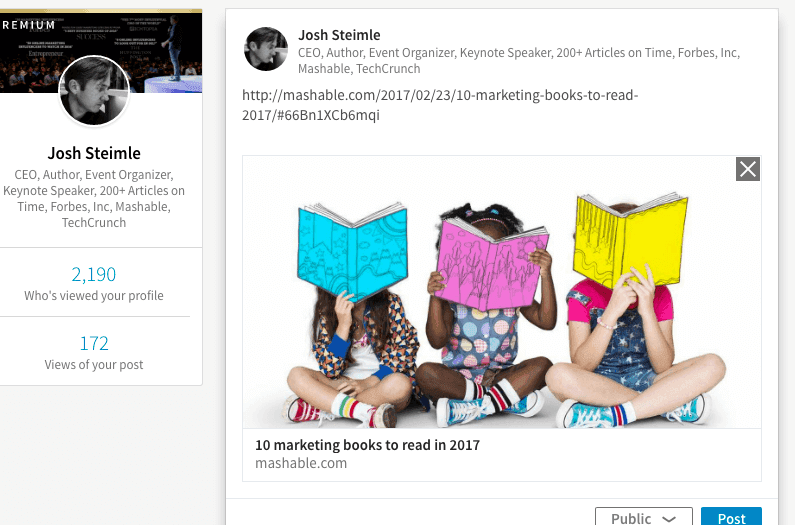
But if I do this, then the people I cited in the article will never know I wrote it, and that they’re included in it. By using the @ symbol, I can tag them in the post, even if I’m not directly connect to them, like this:
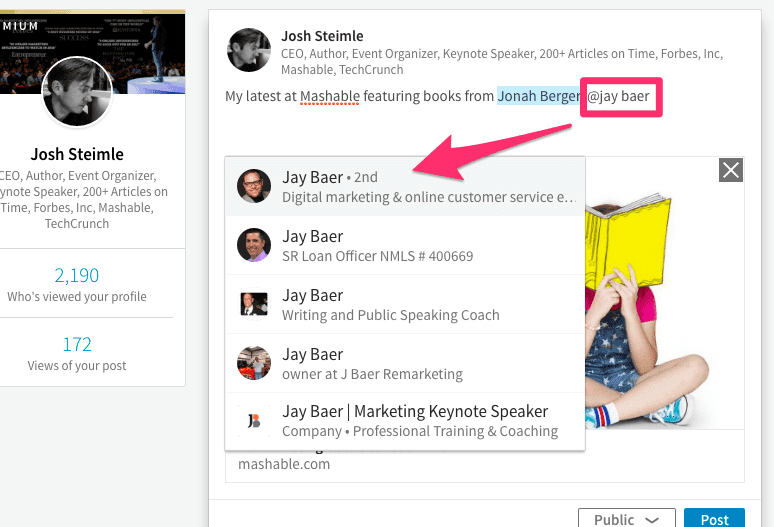
Typing @ in front of a name brings up this drop down of matching profiles, and I can then select the one I want, which will then alert that person that they’ve been mentioned in a post. Jay Baer’s a high profile, busy guy, but even he is probably going to check out a Mashable article that he’s tagged in. Heck, he might even check out a normal blog post that isn’t on a high profile pub, because most people don’t do this kind of tagging, which means you can break through the noise by doing it before everyone is doing it.
You can also see above what it looks like after the name is linked, as you see that Jonah Berger’s name is highlighted in blue.
Facebook works pretty much the same way.
How to Get the Link
Here’s how to get the easy-to-share link for Facebook, Twitter, and LinkedIn.
Talk about not making it easy…to get the link that will take people directly to a post you have to click on the date/timestamp. Not exactly intuitive, but that’s where Facebook decided to put the direct link, and now you know.
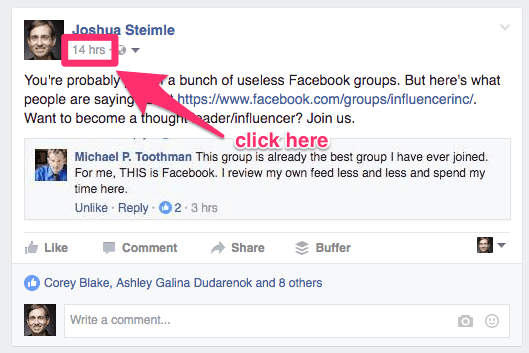
When you click on this it will take you to a new URL that only shows this post, and you can copy and paste the link from your browser bar. And by the way, if you want to join the group Michael is saying is “the best group I have ever joined” and get all sorts of tips on how to build your personal brand and become an influencer you can apply right here.
While viewing the tweet you want to get the link for, click on this arrow in the upper right corner of the tweet, then click on “copy link to tweet”.
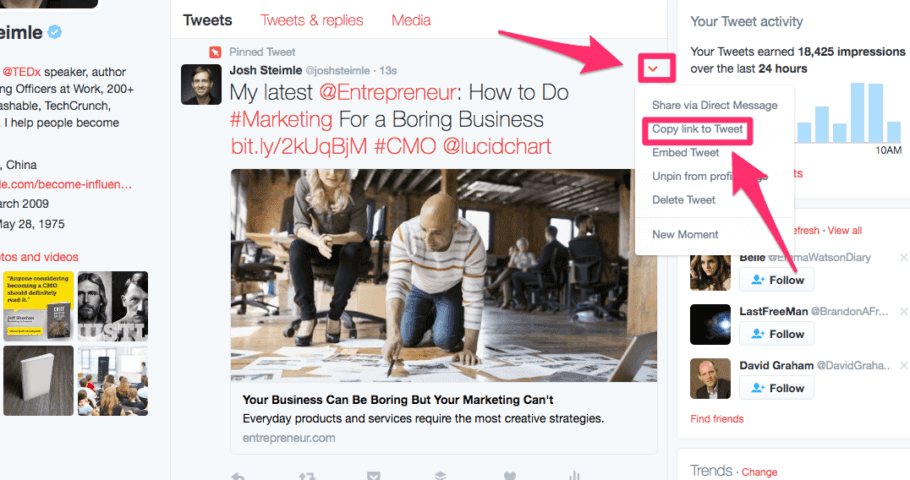
Twitter will then give you a link like this https://twitter.com/joshsteimle/status/832035015055777793 (please retweet 🙂
Find whatever you’ve posted, and click on the arrow in the top right corner, then “copy link to share”.
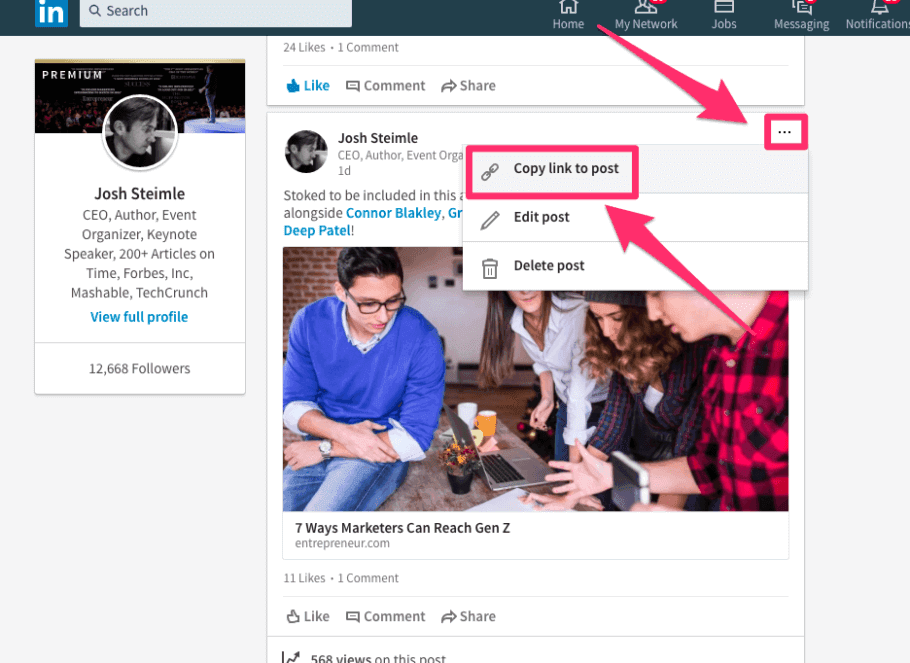
Bonus tip: Notice how Daniel gave me thanks for sharing this? He wouldn’t have known I shared it except that I tagged him in the post. All the other people I tagged also got a notification about me posting this. If you’re looking for a way to get the attention of influencers and develop a relationship, this is one way you can give them some value–share their content but also tag them and everyone they mention in their content. It’s win-win because not only does Daniel get his content shared, not only does this post notify each of the other people I tagged that Daniel included them in his content, but it also notified those other people that I’ve shared this content and tagged them, and they may end up taking a look at my profile and who knows what might happen.
Once you’ve got the links, copy and paste them and put them in an email, a Slack group, a forum, or however is easiest for your friends. Make it drop dead easy for them to share your content and they will, and everybody wins.
Update: I just had to add this one in.
Soon after I wrote this post I was a guest on the The Business Building Rockstars Show, run by Nicole Holland. The day after I was on the show, I got this email from Nicole:
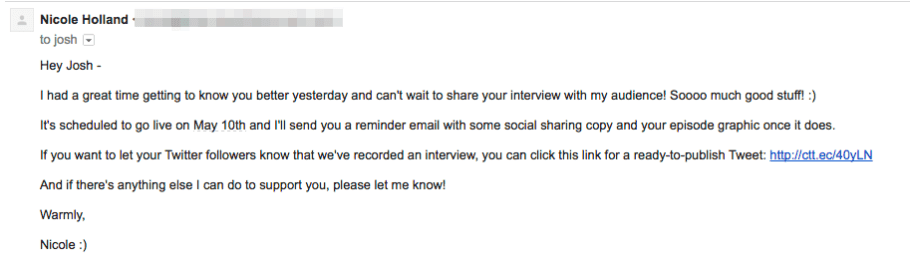
Clicking on the ready-to-publish Tweet in Nicole’s email took me to this:
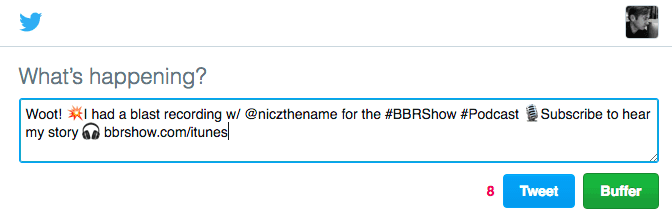
From here I can edit the tweet before I publish it, or I can just click “Tweet” and I’m done. Nicole has made it sooooo easy for me to share her content there’s no way I’m not going to share it. And also notice how Nicole told me she was going to send another email with social share copy and a graphic after the show is published? Talk about being on top of things.
Can you apply this to the content you create? For Nicole she sends out this email to everyone she interviews for her podcast, but could you make it this easy for everyone you include in your blog posts or articles? What about including a ready-to-publish Tweet link in your email newsletter? Or within the body of your blog posts, like Michael Hyatt does?
